


Yalla Ludo - Ludo&Jackaroo
4.314.57K Reviews
App Specs
- Version
- 1.5.1.0
- Updated On
- License
- Free
- Downloads
- 100,000,000+
- Developer
- Aviva Sun
- Categories
- Board
- Platform
- Android, iOS
Screenshots






 Analysis by AppCompare
I like the idea of a board game that can fill a short gap in the day and still give friends or relatives something to talk about afterward. Yalla Ludo - Ludo&Jackaroo brings Ludo and Jackaroo to a phone, mixing familiar turn-based play with online matches and voice chat. It is a free board game from Aviva Sun, and its large player base makes it easier to see why people keep returning to this kind of simple, social competition.
When a shared game fits the household
Picture a family waiting for dinner, or a couple of relatives in different homes trying to spend a little time together without organizing a video call. A Ludo match gives everyone a clear activity: take a turn, react to the dice, and enjoy the small rivalries that build naturally. I find that format more welcoming than a game that expects everyone to learn complicated controls before they can join in.
There is a practical distinction, though: playing on one phone is not the same as gathering around a physical board. A shared device can work for a quick turn-taking session, but the online and voice-chat side is better suited to people using their own devices. Before handing a phone around, I would agree on whose account is open and avoid treating a personal profile as a household profile. The game’s social layer makes that boundary worth thinking about, especially when several people share a screen.
Guides and Analysis on Yalla Ludo - Ludo&Jackaroo
What to decide before the first match
The game is free to download, but it includes optional in-app purchases ranging from $0.99 to $299.99 per item. That is a wide range, so I would check the purchase screen carefully and decide in advance whether spending is off limits, especially if a child may use the device. A free entry point does not mean every optional item is free, and keeping that distinction clear helps prevent an unexpected checkout.
For a shared tablet or phone, I would also make a simple routine: use the intended player’s account, keep purchase approval with the adult who manages the device, and close or switch out of the game when another person takes over. Those are household habits rather than special controls I would assume the app provides. They matter because social play and profile customization can make a game feel personal even when the hardware is shared.
A familiar board-game idea with an online social layer
Remember the days of gathering around a board with family and friends, rolling dice, and making strategic moves to outsmart your opponents? Yalla Ludo captures that nostalgic essence perfectly. It seamlessly blends the simplicity of traditional board games with the convenience of mobile gaming. Trust me, whether you’re a veteran player or a newbie, there's something in it for everyone.
Game Modes Galore
The app offers a variety of game modes to keep things interesting. You can choose to play against AI if you're looking to hone your skills or jump into multiplayer mode to challenge friends or random players worldwide. The multiplayer mode is a personal favorite of mine. There's nothing quite like showing off your Ludo prowess to people across the globe!
Worth Reading Before You Choose

Baby Panda World Brings Quick Play to Modern Phones, but Its Game Library Feels Busy

ESPN’s Live Game View Makes Following Close Games Easier

QuizzLand Review: A Good Fit for Short Trivia Breaks, Not Every Player

Basketball Stars: Multiplayer Is Fast, but Can It Recover When Matches Go Wrong?

WEBTOON Turns Phone Updates Into a Better Reading Routine

Link to Windows Runs on Shared Habits, Not Social Feeds
And if you're in the mood for something different, the Jackaroo mode is a delightful alternative. It’s similar to Ludo but with a few twists and turns that add a layer of strategy. I found myself quickly hooked on trying to master this new challenge.
How it feels in actual play
When I want a low-pressure warm-up, I start with the AI rather than joining a public match immediately. That gives me room to get used to the controls and think through my moves without the added social pressure of strangers waiting for a turn. I would treat that option as practice, not as a promise that every match will feel like a perfectly paced solo puzzle; the appeal here is still the changing decisions and the people on the other side of a multiplayer game.
Against familiar players, the game works best when everyone agrees on a time to play and has a stable enough connection to stay involved. A turn-based board game is less demanding than a fast-action title, but pauses still affect the table’s rhythm. If someone drops in and out or is distracted by other apps, a match can lose its easy, conversational flow. I would choose a shorter session when the group is busy rather than expecting the game to hold everyone’s attention for an open-ended evening.
Social play, with sensible boundaries
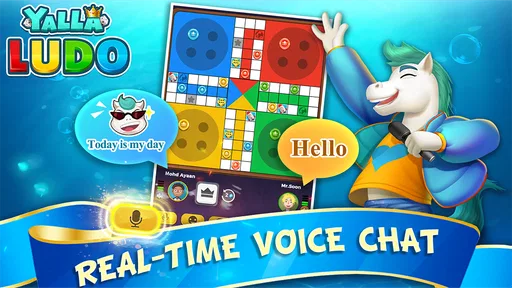
The voice-chat option changes the feel of a match. Instead of silently moving pieces, players can react to lucky rolls and questionable choices as they happen, which can make a remote game feel closer to a real gathering. That is a genuine strength for friends who already know one another. With strangers, I would be more selective about using voice chat; not everyone wants an open conversation while playing, and a quiet match may be the more comfortable choice.
Avatars and emojis add a little personality without changing the basic board-game appeal. I see them as decoration and social shorthand rather than a reason to spend. If you are mainly here for the match itself, you can focus on learning the rules and coordinating with your group instead of chasing profile extras. That keeps the experience centered on play and makes it easier to judge whether you enjoy the game before considering any optional purchases.
Age, trust, and who should play
The game carries a Teen content rating, so I would not treat it as an automatically suitable choice for every child just because Ludo is familiar. The online multiplayer and voice-chat elements make the context different from a board game played only with relatives in the same room. For younger players, an adult should consider whether public interaction is appropriate and establish clear expectations about speaking with other players and spending on the shared device.
Its popularity is substantial: it has a 4.3 average from around 1.2 million ratings, with over 100 million installs. Those figures tell me that many people have tried it, not that every match will be friendly or every player will enjoy its social side. I would recommend it most readily to adults, older teens, and families who are comfortable setting their own boundaries around online play.
Where it sits among board-game alternatives
If your usual choice is a physical Ludo board, this version is convenient when people are apart or when there is no board handy. It also adds the possibility of meeting random opponents, which a family game at home does not. The trade-off is that a phone cannot reproduce the shared tabletop atmosphere, and online play depends on coordination and a willingness to use a screen as the meeting place.
Compared with a quiet, single-player puzzle, this is a more social and less predictable way to spend a few minutes. If you want uninterrupted solo focus, a puzzle game is probably a better fit. If you want a fast action game, the turn-based pace may feel slow. I would pick this one when the point is the company and the friendly suspense of a dice roll, not constant motion or a long story.
Smooth User Experience
One thing I absolutely love about Yalla Ludo is how easy it is to navigate. The user interface is clean, intuitive, and just plain fun to use. The graphics are vibrant and engaging, making each match a visually appealing experience. I appreciate that the developers clearly put a lot of thought into making the app accessible and enjoyable for everyone.
The current version is 1.4.9.1, and the game requires Android 5.0 or later. It first appeared on September 20, 2018, so it is not a brand-new experiment in mobile board gaming. I would still check that the phone or tablet has enough room and that its operating system meets the requirement before installing; on a shared device, compatibility is a simple thing to settle before a group has planned a game night around it.
Interactive Features
What really sets this app apart is its interactive features. You can send voice chats during gameplay, which adds a whole new dimension to the experience. It feels like you're sitting across the table from your opponent, adding a social element that's often missing in mobile games. Plus, you can customize your profile and express your personality with unique avatars and emojis. It’s a small touch, but it makes the game feel more personal.
For a household, I would keep coordination simple: decide whether the match is for relatives who already know one another or for open multiplayer, settle who is using the device, and agree how long the group wants to play. These small choices prevent the common mismatch where one person expects a quiet board game and another expects an ongoing voice conversation. If you are inviting friends, arranging the session first is more reliable than assuming everyone will be available whenever you open the app.
Why You'll Love It
There are countless reasons to fall in love with Yalla Ludo - Ludo&Jackaroo. For one, it’s a fantastic way to connect with friends and family, especially if you're apart. The nostalgia factor is real, bringing back memories of childhood game nights. And if you’re competitive like me, the thrill of outsmarting your opponents never gets old.
I would especially recommend it to people who already enjoy Ludo and want an easy way to arrange a remote match, or to groups who like chatting while they play. It is less compelling for someone who wants a purely private experience, dislikes voice interaction, or finds turn-based games too slow. Jackaroo adds a change of pace for players ready to try another board-game style, but the main reason to install is still the blend of familiar rules and social play.
Not to mention, the app is constantly updated with new features and improvements, ensuring that the gameplay remains fresh and exciting. The developers seem committed to enhancing the user experience, which is always a plus in my book.
Making the most of a session
A useful way to approach the game is to separate learning from social play. Try the AI mode first if the rules or controls feel unfamiliar, then move to friends or public opponents once you know what you want from a match. If you are playing with family, make sure everyone understands the turn-taking and how voice chat will be used before the first roll. That small bit of setup keeps the focus on the game rather than on explaining the interface mid-match.
I also would not assume that every online opponent is looking for the same kind of interaction. Some players may want conversation; others may simply want to finish a board game. Treat voice as optional social company, not a requirement for enjoying the match. The same goes for customization: it can make a profile feel more expressive, but it is not necessary to get the core pleasure of weighing a move and seeing how a rival responds.
My household verdict
For a household, my recommendation is conditional but positive. This is a useful choice when older teens or adults want a familiar board-game format that can connect people across homes, and it can work well on a shared device if account use and purchases are handled deliberately. Its Teen rating and online social features mean I would make the age decision thoughtfully rather than treating it as a children’s board game by default.
It is not my first pick for a family that wants a completely offline activity, a private solo challenge, or a game that requires no coordination. A physical board is better when everyone is together and wants that hands-on table experience; a quiet puzzle is better when one person wants to play alone. But when the group wants to roll dice, talk, and compete from separate places, this app offers a practical middle ground.
Final Thoughts
In a world full of fast-paced, high-tech games, Yalla Ludo - Ludo&Jackaroo offers a refreshing return to the basics. It’s a game that encourages strategy, social interaction, and just plain fun. Whether you're a fan of the classics or looking for something new to try, this app is definitely worth downloading. So, roll the dice and give it a shot – you won’t be disappointed!
Pros
- Engaging multiplayer experience.
- Simple and intuitive interface.
- Quick matchmaking with players.
- Attractive graphics and design.
- Voice chat enhances interaction.
Cons
- Contains in-app advertisements.
- Limited offline gameplay options.
- Consumes significant battery power.
- Occasional connectivity issues.
- In-app purchases can be pricey.
FAQs for Yalla Ludo - Ludo&Jackaroo
What is Yalla Ludo - Ludo&Jackaroo, and how does it work?
Yalla Ludo - Ludo&Jackaroo is a mobile gaming app that offers digital versions of the classic Ludo and Jackaroo board games. It allows users to play online with friends or with a global community. The app includes voice chat features, letting players communicate in real-time during gameplay, enhancing the social experience.
Is Yalla Ludo - Ludo&Jackaroo free to play?
Yes, Yalla Ludo - Ludo&Jackaroo is free to download and play. However, the app includes in-app purchases for items such as coins and special dice, which can enhance the gaming experience. These purchases are optional, and players can enjoy the game without spending money.
What are the main features of Yalla Ludo - Ludo&Jackaroo?
The app features classic Ludo and Jackaroo games with customizable boards and pieces. It allows voice chat during gameplay, adding a layer of interaction. Players can join or create rooms, participate in tournaments, and earn rewards. There is also a social aspect, enabling players to add friends and join clubs.
How does the voice chat feature work in Yalla Ludo - Ludo&Jackaroo?
The voice chat feature allows players to communicate with each other directly during gameplay. This is facilitated through the app’s built-in microphone access, enabling real-time conversations. Users can mute or unmute themselves as needed, providing a more interactive and engaging gaming experience.
Are there any privacy concerns with using Yalla Ludo - Ludo&Jackaroo?
Yalla Ludo takes user privacy seriously. The app requires permissions for microphone and contacts to enable features like voice chat and friend invitations. Ensure you review the app’s privacy policy to understand how your data is used. Users can adjust permissions in their device settings to maintain control over their privacy.


